Omi AI Translator: taking the language problem out of travel
Worried you will not be able to say what you need to on a trip? A translator that speaks for you, light enough for a small bag and cleared for flights, is a genuinely useful thing to carry.
The GUXON Omi translator works with a companion app (free to download). Setup is not complicated — once the first pairing is done, you can use it directly from then on.
📌 How it differs from just using your phone
- ✅ No unlocking and switching screens over and over — fewer steps, faster response
- ✅ The operation is more direct: speak, translate, reply, and the rhythm holds
- ✅ The conversation keeps going, instead of breaking every time someone reaches for a phone
⚡ Omi supports 150+ languages, translating quickly and reliably.
🧠 Three things it does well
- Response speed: it gets into translation mode when you need it, rather than eating time in menus.
- Stable connection: with the app, what matters is that the link does not drop mid-conversation.
- Straightforward flow: no constant screen switching or settings checks, so the conversation is not constantly interrupted.
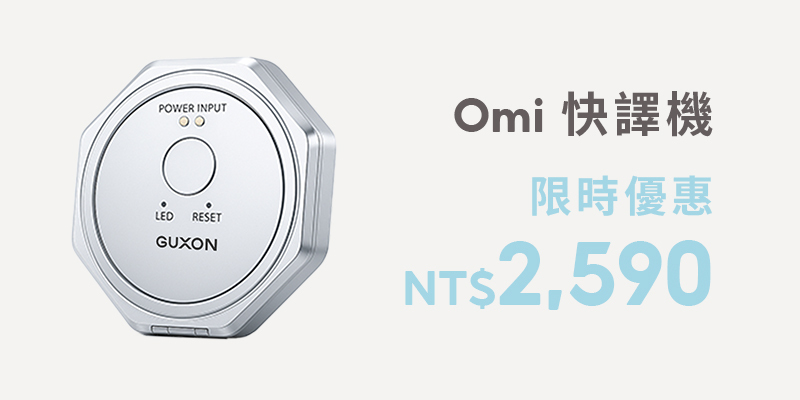
- ✅ Very slim — around 46g and 6mm thick. It adds almost nothing to a pocket or a day bag.
- ✅ 150+ languages, covering the major ones. Cross-border meetings, independent travel, video calls, offline use, live video translation.
- ✅ More than a translator — it doubles as a phone stand.
What the translator actually does
| Function | Detail |
| Voice translation | Speak and it translates, then plays back in the target language |
| Photo translation | Point it at a menu, a sign or a document |
| Simultaneous interpreting | Two people take turns, with the translation shown live on screen |
| Video translation | Translated text appears during a video call |
| Voice to text | Speech converted straight to text, useful for quick notes |
| Audio playback | Translations can be spoken aloud, so pronunciation is not a barrier |
| Offline translation | Basic translation still works without a connection |
| Languages | Over 150, expanding with system updates |
| Speed | Real-time, suited to live conversation |
| NFC business card | NFC card exchange supported |
| Weight | Under 50g |
| History | Translations are saved and are not easily lost |
Is there a charge? Any hidden fees?
Most core translation functions are free to use, with no hidden charges.
| Item | This product | Typical alternatives |
| Voice translation | Free | Free |
| Photo translation | Free | Free |
| Simultaneous interpreting | Free | First 30 minutes free |
| Video translation | Free | First 30 minutes free |
| Number of translations | Free, no cap | Often requires top-up |
| Video calls | Free, no time limit | Usually limited |
| Translation history | Kept permanently | Not always supported |
| Language packs | Free to download, permanently | Varies |
Frequently asked questions
Q. Does translation work without an internet connection?
Real-time translation is best used with a connection, for accuracy. Offline translation currently covers 12 widely used languages, which is enough for an unexpected need on the road.
Q. Is there a usage or time limit?
Most translation functions are free, with no subscription and no cap on translation count or duration.
Q. Which languages are supported?
Over 150 at present, and the list grows with system updates.
Q. When is photo translation useful?
Restaurant menus, street signs, document instructions, exhibition information — particularly handy when travelling independently.
Q. Will my translation history disappear?
History is stored on the device and is not deleted automatically, so you can go back to it later.
Q. Which languages work offline?
Thirteen in total, and the offline files must be downloaded in advance: Chinese, English, Japanese, Korean, French, Spanish, Russian, German, Vietnamese, Thai, Portuguese, Arabic and Hindi.
Q. Why is my offline translation not working? Is it limited to certain features?
Offline translation currently works with two functions — conversation translation and one-tap translation. For the fuller experience, use it with a connection.
Q. Can I charge my phone wirelessly with the translator attached?
No. Take the translator off first, then charge the phone wirelessly. The translator itself does not support wireless charging and must be charged by cable.
Q. How do I use video translation?
It runs through the function built into the app: 1. Open the app. 2. Tap "Video translation". 3. Choose the language for each side. 4. Tap to share the link. Your contact clicks the link to join the call, and video translation is active.
Note: video translation does not work through third-party calling apps such as WhatsApp, LINE or KakaoTalk. It has to be the app's own video function.
Q. Does the other person need the app, or their own Omi?
Neither. They only need to open the link you share to join the video call.
Q. Does simultaneous interpreting mean subtitles and voice translation on foreign videos?
Omi's simultaneous interpreting shows the translation live as two people take turns speaking, and it can also translate audio from video — YouTube, online courses and so on. After the first pairing it reconnects automatically, but you will need a second device to play the video.
Q. Does it disconnect if I stop translating for a while?
Not over short gaps. After 10 minutes of inactivity it may enter power-saving standby — press the Omi power button once and it reconnects.
Q. How do I pair it the first time?
Download the app, press the single button on the Omi unit, and turn on Bluetooth on your phone. When "AI-TALK" followed by a string of digits appears, you are ready to go.
✅ A reminder: after 10 minutes idle the Bluetooth connection drops. One press of the Omi button brings it back.
Supported languages (updated over time)
| Group | Languages |
| Widely used | Chinese, Traditional Chinese, Cantonese, English, Japanese, Korean, French, Spanish, German, Arabic, Russian, Thai, Vietnamese |
| European | Italian, Portuguese, Dutch, Swedish, Finnish, Danish, Czech, Polish, Romanian, Hungarian, Slovak, Slovenian, Croatian |
| Asian | Indonesian, Malay, Hindi, Tamil, Telugu, Bengali, Nepali, Sinhala, Malayalam, Kannada |
| Middle East and Africa | Hebrew, Persian, Amharic, Swahili, Somali, Zulu |
| Others | Ukrainian, Urdu, Welsh, Irish, Basque, Mongolian, Burmese, Lao, Khmer, Georgian, Armenian, Azerbaijani |
| Regional variants | English (multiple), Spanish (multiple), French (multiple), German (Austria / Switzerland), Arabic (multiple regions) |
Further reading and related products